Out of Scope Email Template (Copy, Paste, Get Paid)
A client just asked for something that wasn’t in the deal. Here’s the email to send, in full and free, plus two variants and the record-keeping that gets it approved and paid.
The short answer: a 3-step formula
- Name it. Repeat the request and say it falls outside the scope you agreed, with the date or document.
- Price it. Give the extra fee and the new delivery date, in numbers, not “a bit more.”
- Ask for approval first. Work starts after a written “Approved.” Offer to park it if they’d rather not.
Want the change order form, scope-creep log and kickoff checklist that make this email work? Get the Scope Lock Kit for $29, instant download.
The out of scope email template (free, full version)
This is the main script from the Scope Lock Kit, word for word. Replace the brackets and send it the same day the request comes in.
Why it works: it opens with thanks rather than a complaint, it anchors to a specific agreement, the cost and date are spelled out, and it ends with an easy yes or an easy “not now.” There’s no apology anywhere in it, and that’s on purpose.
Two short variants
Softer: for long-term or relationship-heavy clients
Use this when the client is great and the request is small, but you still don’t want to set a precedent.
Firmer: when the extras keep coming
Use this on the third or fourth “quick” ask. It lists what’s piled up so the client can see the pattern, not just the latest request.
How to tell a client something is out of scope
Most freelancers don’t struggle with the wording. They struggle with the timing. The longer you wait, the more it looks like you’re changing the rules after the fact. A few rules that make the conversation easy:
- Same day, every time. Reply to the request the day it lands. A quote that arrives before the work is a normal business step. An invoice that arrives after is a surprise.
- Reply in the same thread. Put your answer right under the client’s request, so the ask and the price sit together.
- Point to something written. “Outside the scope we agreed on Oct 3” beats “I don’t think that was included.” If you have nothing written to point to, that’s the real problem, and the kickoff checklist in the kit fixes it for the next project.
- Always give a way out. “We can park this for phase two” lets the client say no without anyone losing face. People approve more readily when no isn’t a fight.
What not to say
These phrases feel polite. In practice they invite the client to push back, because they signal you aren’t sure you deserve to be paid.
- “Sorry to bring this up, but…” You’re not doing anything wrong. Quoting extra work is your job. Drop the apology.
- “I’m not sure if this is in scope?” Check before you write. A question mark hands the decision to the client, and the client will usually decide it’s included.
- “It’ll only take a few minutes, so…” Then it’s free forever. If it’s small, price it small, or comp it on purpose and say so.
- “I’ll just do it this once.” Nothing gets done just once. If you comp it, log it and say clearly that the next one will be quoted.
- “Per our contract, you are obligated to…” Legal threats over a $150 change escalate fast. Stay process-based: here’s the scope, here’s the price, here’s the choice.
- Doing the work first and invoicing later. That’s the most expensive habit there is. Approval comes first, then the work.
A scope creep email template isn’t a record. A change order is.
An email gets the conversation started, but it’s a weak record on its own. It gets buried in a long thread. “Sounds good!” could mean approve, or it could mean “I read it.” And three months later, nobody can add up how many extras were requested, approved, declined or done for free.
That’s why the email above refers to a change order number. Each request gets its own one-page form: description, why it’s out of scope, fee impact, timeline impact, and the client’s name and date of approval. Then every request, approved or not, goes into a scope-creep log, so you can see the real cost of “tiny” asks across a project.
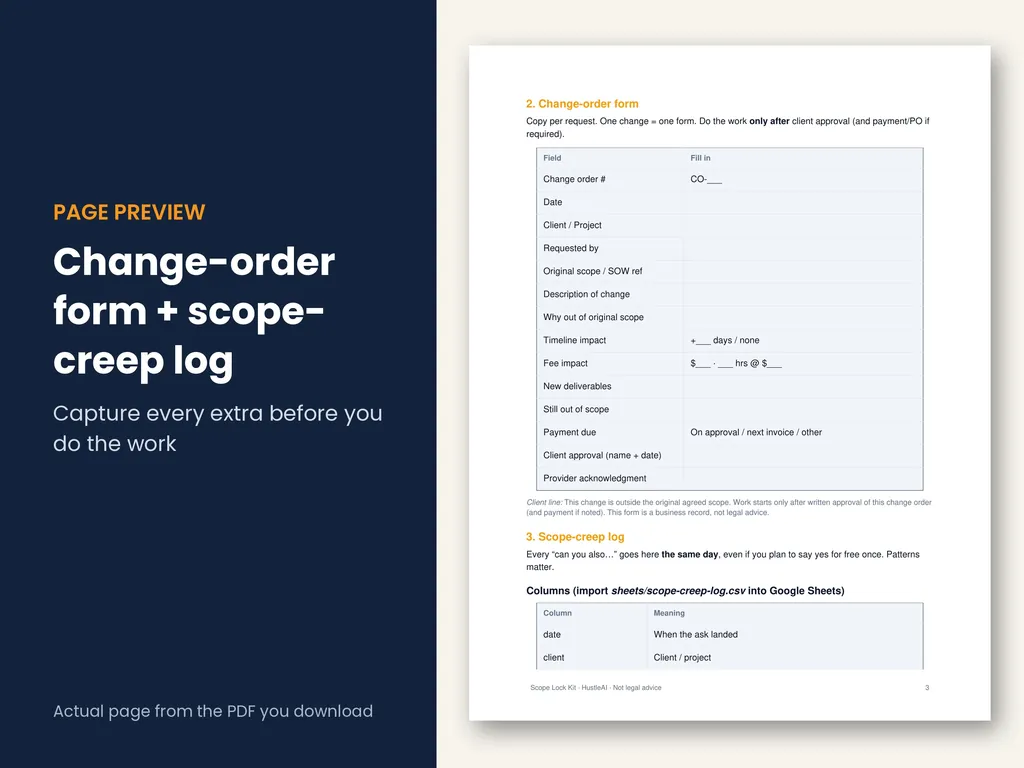
The change order email is the delivery method. The form and the log are what let you point to a clean “Approved — Jordan, Oct 28” when the invoice goes out.
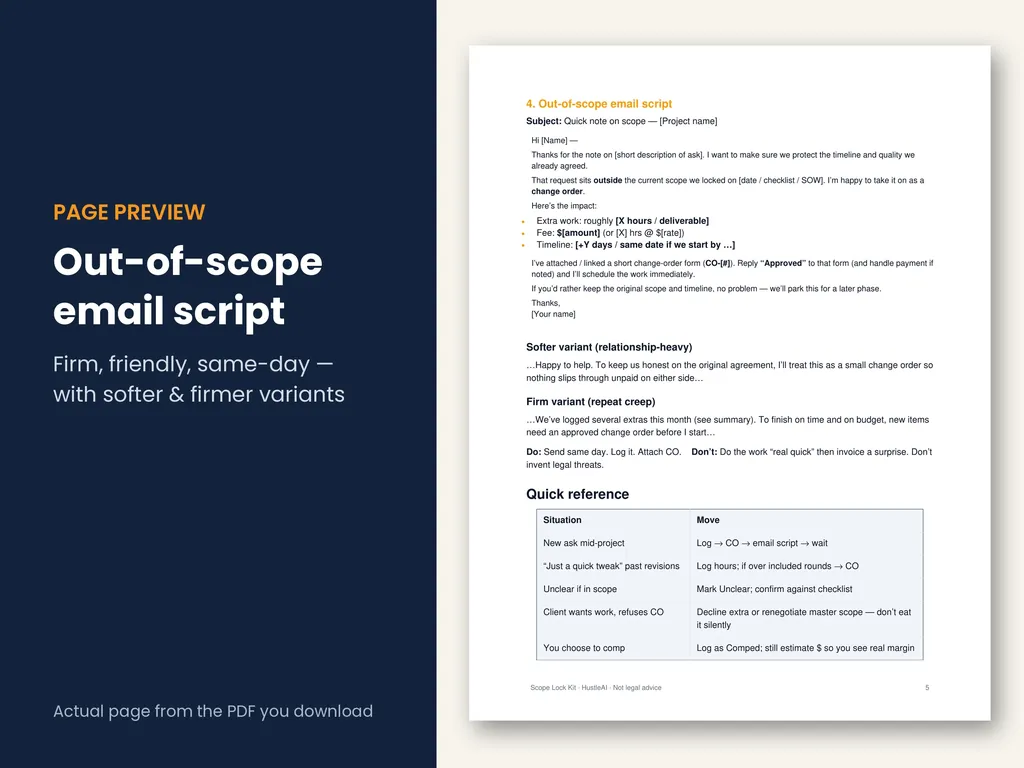
Get the full system for $29
The Scope Lock Kit has the kickoff checklist, the change order form, the scope-creep log (as a CSV for Google Sheets or Excel), and this email with both variants. It’s one download you can use on every project.
Get the Scope Lock Kit — $29- Instant download after checkout
- 7-page PDF + 3 CSV templates
- Works in Google Sheets, Excel, Numbers
- Secure checkout by Stripe
Related: pricing the extra work
The email needs a number in it. If you’re not sure what to charge, read how much to charge for extra revisions. It has two pricing methods with worked examples and a revision-policy line you can paste into your next proposal.
FAQ
How do you tell a client something is out of scope without sounding rude?
Point to the agreement, not your feelings. Name the request, say it falls outside what you agreed on a specific date, give the price and timeline impact, and offer the choice: approve it as a change order or park it. Clear numbers and a choice read as professional. Apologizing and hedging is what makes it awkward.
Should I send the out of scope email or bring it up on a call?
Send it in writing, even if you talk about it on a call first. A call is fine for tone, but the price, the new date and the client’s approval need to live somewhere you can point to later. If you discuss it live, follow up the same day with the email and the change order.
What should a change order email include?
Four things: what was requested, why it is outside the original scope, the fee and timeline impact, and a clear ask for written approval before work starts. Attach or link a numbered change order form so each request has its own record.
What if the client says the request was always in scope?
Go back to the written scope: the kickoff checklist, proposal or SOW. If it’s listed, do it. If it isn’t, say so plainly and quote the document. If the scope was genuinely vague, agree on a fair split this time and tighten the wording for the rest of the project. Don’t quietly absorb it, because that sets the precedent.
Can I do small requests for free?
Yes, if it’s a deliberate choice. Log it anyway, mark it as comped and tell the client you’re covering it this once. That way the favor is visible, and the next request starts from a clear line instead of a habit.
Is this email a legal document?
No. It’s a business communication. It helps you keep a clear paper trail inside whatever contract you already have. For contract terms, payment disputes or anything legal, talk to a licensed attorney in your area.
Back to Scope Lock Kit.